How to Create an ITF-14 Barcode for Shipping Cartons
Published on June 28, 2026 · 5 min read
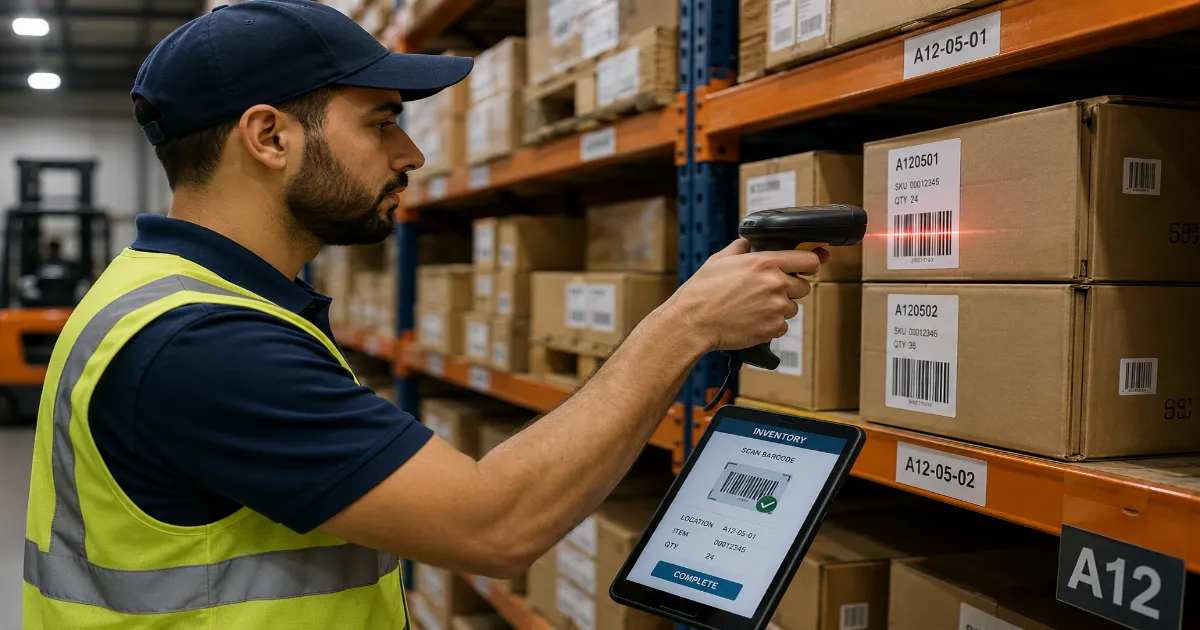
When we think of barcodes, we usually think of the delicate little UPC stickers on the back of a shampoo bottle or a book. Those barcodes are designed for pristine retail environments and high-resolution checkout scanners.
But what happens before that shampoo bottle reaches the shelf? It spends weeks traveling through the brutal environment of the global supply chain. It is packed into a corrugated cardboard box, tossed onto a wooden pallet, wrapped in plastic, shoved by a forklift into a dusty warehouse, and bounced around in the back of a freezing truck.
If you print a standard, delicate retail barcode on the outside of that rough, brown cardboard box, it is going to fail. The ink will bleed into the porous cardboard, the scanners on the conveyor belts will misread it, and your pallet will get lost in a distribution center.
To survive the logistics network, you need a barcode designed specifically for brute-force durability. You need the ITF-14. Here is everything you need to know about generating and using the ultimate warehouse barcode.
What is an ITF-14 Barcode?
ITF stands for "Interleaved Two of Five." The "14" signifies that it always encodes exactly 14 digits of data.
Unlike retail barcodes (UPC/EAN) which identify a single consumer item at the cash register, the ITF-14 is used exclusively to identify Trade Items—specifically, outer shipping cartons, cases, or pallets that are not intended to be sold individually at a retail checkout.
For example:
- A single can of soda has a UPC-A barcode.
- The 24-pack cardboard flat holding those cans has an ITF-14 barcode printed on the side.
When a forklift driver scans the ITF-14 on the outer box, the warehouse management system instantly knows, "This box contains 24 units of the specific UPC item."
The Anatomy of the 14 Digits
The 14 digits inside an ITF-14 are not random; they are directly mathematically linked to the retail barcode of the product inside the box.
Let us break down the structure:
- Digit 1 (The Packaging Indicator): This number (from 1 to 8) tells the system what kind of packaging level this is. For example, a '1' might indicate a carton of 10 items, while a '2' might indicate a larger master case containing 5 cartons.
- Digits 2-13 (The Base Product Number): This is the exact company prefix and product number from the item's retail EAN or UPC barcode. (If you are adapting a 12-digit UPC, a leading zero is added to pad it out).
- Digit 14 (The Check Digit): Just like retail barcodes, the final number is mathematically calculated based on the previous 13 digits to prevent scanning errors.
Because the ITF-14 is derived directly from the inner retail barcode, it allows the entire supply chain—from the manufacturer in China to the distribution center in Chicago—to track bulk inventory seamlessly.
The Secret Weapon: The Bearer Bar
If you look at an ITF-14 barcode, you will immediately notice something unique: it is surrounded by a thick black rectangular border. This is called the Bearer Bar.
Why is it there?
In a fast-paced warehouse, automated laser scanners are mounted on conveyor belts, sweeping red beams across boxes flying by at high speeds. Because the ITF-14 barcode is "interleaved" (meaning data is encoded in both the black bars AND the white spaces between them), a laser scanner sweeping at a severe diagonal angle might accidentally read only half the barcode, assume it is complete, and register a false number. This is known as a "short scan."
The thick black Bearer Bar prevents this. If the laser beam hits the thick black border at the top or bottom of the barcode before crossing all the vertical lines, the scanner's software instantly recognizes that it did not get a clean horizontal read and forces a rescan.
Furthermore, when printing directly onto corrugated cardboard with low-quality flexographic printers, the Bearer Bar acts as a structural dam. It literally prevents the printer's printing plate from crushing the delicate vertical lines, ensuring the ink does not bleed and ruin the data matrix.
Generating Your ITF-14 Barcode on QRinsec
Creating a logistics-ready ITF-14 is simple, provided you have your underlying retail numbers ready.
Step 1: Determine Your Packaging Indicator
Decide on your packaging level indicator (usually a 1 for standard cartons).
Step 2: Enter the Data
Go to the QRinsec barcode generator and select ITF-14. Enter the indicator digit followed by your 12-digit product number.
Step 3: Let the System Do the Math
Do not worry about calculating the 14th check digit. The QRinsec algorithm automatically runs the modulo 10 calculation and appends the correct final digit. It will also automatically generate the thick Bearer Bar border required for compliance.
Step 4: Download for Commercial Printing
This is critical: you must download the barcode as an SVG vector file. Because these barcodes are often printed directly onto massive cardboard boxes using industrial printers, the file must be infinitely scalable without losing resolution. A pixelated JPG will result in a massive logistics failure.
Strict Printing Guidelines for Logistics
Warehouse automated scanners are aggressive, but they are not magic. You must adhere to strict GS1 printing guidelines for outer cartons:
- Magnification (Size): Because they are read from a distance (often while moving on a forklift), ITF-14 barcodes must be printed large. The standard target size is about 6 inches (152mm) wide by 1.6 inches (41mm) high.
- Placement: The barcode must be printed on at least two adjacent sides of the shipping carton. This ensures that no matter how the box is loaded onto a pallet, a scanner can see at least one barcode.
- Background Contrast: While pure white is best, ITF-14 is specifically designed to be readable when printed directly onto standard brown corrugated cardboard, provided the black ink used is highly dense and non-reflective.
Frequently Asked Questions (FAQ)
Can I use Code 128 instead of ITF-14 for shipping boxes?
Yes, GS1-128 is heavily used in logistics. Code 128 is better if you need to encode extra data like batch numbers, expiration dates, or serial numbers. However, ITF-14 is significantly better if you are printing directly onto rough brown cardboard, as its simple interleaved design is highly resistant to ink bleed.
Can an ITF-14 barcode be scanned at a retail cash register?
No. Point-of-sale systems are not programmed to recognize the 14-digit trade item format. It will return an error if a cashier tries to scan it.
Why does my ITF-14 generation fail?
The most common error is inputting the wrong number of digits. The generator requires exactly 13 digits (the system calculates the 14th). Make sure you did not accidentally include an old check digit in your base string.
Do I have to use the Bearer Bar?
If you are printing the barcode on a clean white paper label that is then stuck onto the box, you can technically use just the top and bottom bearer bars. However, if printing directly onto the cardboard, the full rectangular box is absolutely mandatory per GS1 standards.
Master Your Supply Chain
A beautiful retail product is useless if the box gets lost in a distribution center.
By utilizing the ITF-14 barcode for your outer packaging, you guarantee that your inventory can be tracked, sorted, and delivered with robotic precision through the harshest logistics networks in the world. Head over to QRinsec, input your product data, and generate the heavy-duty barcodes your supply chain demands.
Published by the QRinsec Editorial Team — practical documentation about QR codes, barcode standards, and QRinsec’s client-side tools. Content is reviewed against product testing and published technical documentation from sources such as GS1, Denso Wave, and ISO standards where applicable.
Have questions or corrections? Contact us.
Create your QR code for free
No sign up, no limits — generate and download in seconds.
Open the generator